Below is a in-depth scene breakdown to include the type of camera shot used and if its virtual or in person as well as what assets will be applied to the scene. I have also included any extra notes to take into account during production.
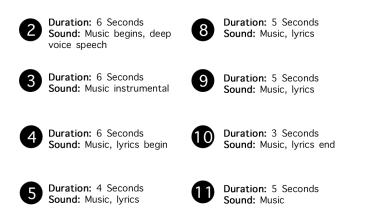
| Scene Description | Camera (Virtual/In-Person) | Assets | Notes |
| AI Face speaking in a deep voice over instrumental (music) | Close Up (V) | Digital mapped face | Occasional glitches and interference |
| Wide shot of car interior, focusing on rear view mirror that has video inside of it. | Wide shot into close up via zoom (I) | Masked video | Shot will zoom into mirror to transition to next scene |
| Video from mirror, a blurred figure pointing at a screen. Screen contains lyrics to song. | Mid shot (I) | Edited video masked onto screen | Shot will zoom out to reveal full shot. Glitches towards the end. |
| Glitching footage of a man holding a protest sign | Close up (I) | N/A | Occasional VHS style interference |
| A British bank note with the AI face lip syncing over usual figure. | Close up (I) | Digital mapped face, edited bank note | Note to be edited before effects applied to easier application |
| Car radio with lyrics showing on the screen | Close up (I) | Added typography of lyrics onto screen | Lyrics to be in time with music |
| Zoomed out shot over the shoulder to reveal previous scene on a computer | Over shoulder close up, zoom (I) | Masked video on computer screen | Shot will zoom out to reveal full shot. Glitches towards the end. |
| Scene glitches on computer to show a figure with an AI face overlaid, lip syncing once again | Mid shot (I) | Digital face on top of figure | Face will glitch, partially revealing original face. |
| AI Face appears body-less again, this time speaking quietly. | Close up (V) | Digital mapped face | Glitches towards the end of scene |
| Glitching footage of someone wearing a protest sign | Mid shot (I) | N/A | Occasional VHS style interference and continued glitching |
| A door on fire as the song phases out | Mid shot, zoom (V) | Fire effects around the door | Video will gradually zoom out before a final interference glitch to end |
Tools
Below I have detailed the software and tools I will use throughout the production of my final VFX piece. This ranges from physical equipment for filming and sound to digital software to help create and apply visual effects.
- iPhone (Filming all of the videos in person)
- Microphone (Recording voice and lyrics for song)
- Adobe After Effects (Main software for creating and applying visual effects, organisation of scenes and final rendering
- Adobe Photoshop (Editing standalone images that will be added into scenes as well as typography)
- Garageband (For putting together and finalising song for the music video)
- Blendartrack (For importing facial capture of AI style face scenes)
Found assets
Below are references to the found assets I plan on using within my final video. This includes to stock videos as well as the instrumental for the song that will be included. These may change during the production process and if so, will be referenced at the end of the video.
Livne, T. (2021) Protest, Sign, Message, Pessimistic. artlist.io. Available online: https://artlist.io/stock-footage/clip/protest-sign-message-pessimistic/192409 [Accessed 9 Jan. 2023].
Livne, T. (2021) Protest, Signs, Flags, Resistance. artlist.io. Available online: https://artlist.io/stock-footage/clip/protest-signs-flags-resistance/192405 [Accessed 9 Jan. 2023].
Wonderlust Beats (2022) (FREE) PinkPantheress Type Beat – Midnight Racer. YouTube. Available online: https://www.youtube.com/watch?v=g2IyxQn0KjQ&ab_channel=WonderlustBeats [Accessed 9 Jan. 2023].